Last updated: October 2026
Overtime Calculator vs Overtime Tax Calculator
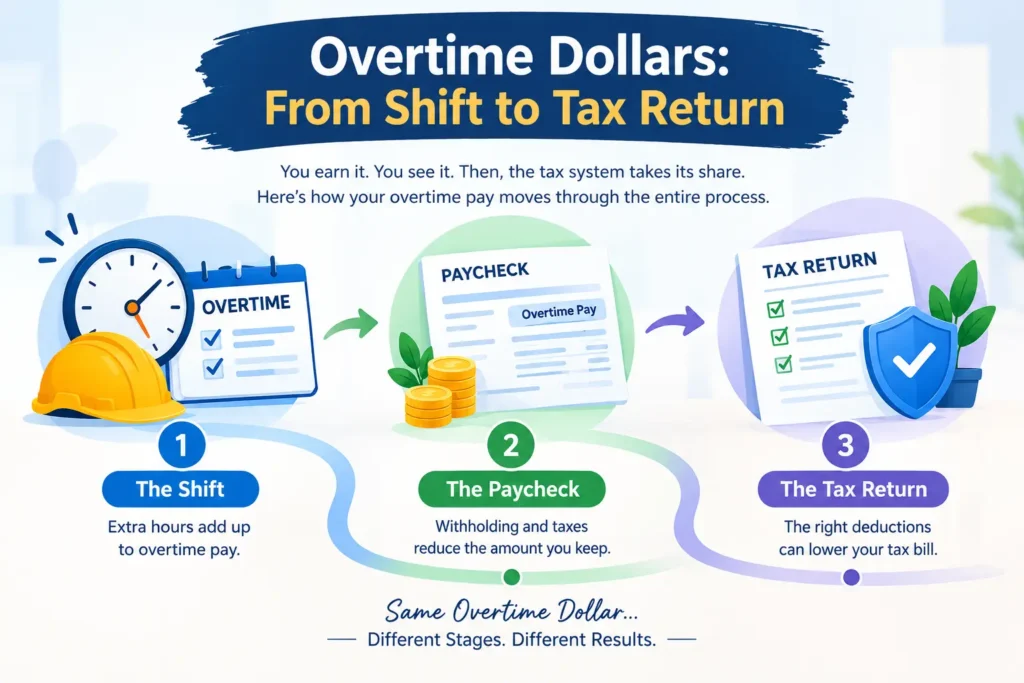
Every extra shift creates overtime dollars, and each dollar changes shape three times before you truly keep it. First, it appears on your timesheet. Next, it lands in your paycheck. Finally, it shows up on your tax return. An overtime calculator and an overtime tax calculator each watch a different part of that journey, and this guide walks through all of it in plain words.
Think of the two tools as two cameras pointed at the same road. One camera records what you earn, while the other records what the tax system may give back. Therefore, when you want the tax side of the story, try our free overtime tax calculator and watch the second camera work.
Table of Contents
- Overtime Tax Calculator and Overtime Calculator: Two Tools for Two Moments
- Moment One: The Shift Ends, and the Gross Number Appears
- Moment Two: The Paycheck Arrives and Feels Smaller
- Moment Three: Tax Season Adds a Second Chapter
- A Worked Story: Rina Adds Six Hours a Week
- Why Pay and Deduction Never Look the Same
- A Simple Habit for Using Both Tools
- Final Thoughts
Overtime Tax Calculator and Overtime Calculator: Two Tools for Two Moments
Most people treat these tools as rivals. However, they never compete, because they work at different times. The overtime calculator works at the start, right after your shift. Meanwhile, the overtime tax calculator works near the end, close to filing day.
This timing difference explains why one result never matches the other. Your first result shows earnings, while your second result shows a tax effect. As a result, comparing them directly feels like comparing a receipt with a refund slip. Each one describes a different event.
So, instead of choosing a winner, think about timing. The next sections follow a single overtime dollar through three moments, and each moment shows which tool helps most.
Moment One: The Shift Ends, and the Gross Number Appears
Your shift ends, and you want to know what the extra hours are worth. An overtime calculator handles this job well. It takes your hourly rate, multiplies it by the overtime multiplier, and then multiplies again by your hours. Consequently, you get a clean gross figure within seconds.
This number feels good, yet it is only a starting point. It ignores withholding, and it ignores your tax return entirely. Still, it works perfectly for early planning. For example, you can use it to decide whether to accept another Saturday shift or to compare two job offers side by side.
Moment Two: The Paycheck Arrives and Feels Smaller
Payday brings the first surprise. The deposit looks lower than the gross figure, and many workers blame overtime itself. However, payroll withholding causes most of that gap. Your employer holds back federal income tax, Social Security, and Medicare from every check.
Some people also fear a special penalty rate. In reality, the tax rate on overtime pay follows your normal bracket, so overtime never gets its own harsher rate. Even so, a large check can raise withholding for a short time, because payroll software assumes you will earn that much all year. Fortunately, the extra amount often returns to you later.
Notice that no calculator changes this moment. Your employer controls withholding and can’t reduce it automatically because of the new federal deduction. If you want to adjust it, you can submit an updated Form W-4 (Step 4(b) on the 2026 form). Therefore, a smaller paycheck says very little about your final tax result.
Moment Three: Tax Season Adds a Second Chapter
For tax years 2025 through 2028, overtime-eligible employees may deduct the premium half of their time-and-a-half pay from federal taxable income. Starting with tax year 2026, employers report this amount in Box 12, Code TT of your W-2, and you can generally deduct only that reported amount. Because this deduction lives on your return, it only matters at filing time.
Here, the overtime tax calculator takes over. It looks at your premium pay, your filing status, and your income level. Then, it estimates the deduction and the possible tax savings. In other words, it turns a pay stub into a tax preview.
Additionally, you can preview the refund side before you file. For example, estimating your possible tax refund helps you see how the deduction might change the money you receive back.

A Worked Story: Rina Adds Six Hours a Week
Meet Rina, a warehouse worker who earns $22 per hour. She works six overtime hours every week for 48 weeks. Her overtime rate is $33 per hour, so the overtime calculator shows $198 per week. Across the year, that adds up to $9,504 in gross overtime pay.
Her return tells a different story. The premium portion is $11 per hour because $33 minus $22 equals $11. Over 48 weeks, that premium reaches $3,168. As a result, her taxable income may fall by up to that amount, as long as her filing status and income limits allow it.
Now look at the gap between $9,504 and $3,168. The first number describes pay, and the second describes the possible deduction. Consequently, Rina should never expect her full overtime pay to disappear from her taxable income.
Why Pay and Deduction Never Look the Same
Rina’s story shows a pattern that repeats for every worker. Three simple reasons explain it:
- The deduction counts only the extra half of overtime pay, not the full amount.
- The deduction lowers taxable income, so your tax bill drops by a smaller amount than the deduction itself.
- Filing status and income limits can reduce or cap the benefit.
Because of these reasons, the two calculators produce different numbers on purpose. Moreover, that difference protects you from a common mistake, which is mixing up earnings with savings. Once you separate the two ideas, both tools become easy to trust.
A Simple Habit for Using Both Tools
A small routine keeps your numbers honest all year. Follow these steps:
- After each block of shifts, run the overtime calculator and confirm your gross pay.
- Keep every pay stub, since stubs usually show regular and overtime pay separately.
- When your W-2 arrives, check that Box 12, Code TT matches your records. If it looks wrong, ask your employer for a corrected Form W-2c.
- Before filing, run the overtime tax calculator with your final yearly totals, using the Code TT amount for 2026 and later.
- Check your state’s rules separately, because state tax treatment can differ from federal rules.
- Share your estimate with a tax professional before you rely on it.
Finally, remember that every online estimate has limits. Tax rules change, and personal situations vary. Therefore, treat each result as a helpful guide rather than a final answer.
Final Thoughts
Extra hours ask a lot from you, so your numbers deserve the same care as your effort. When you know which tool answers which moment, you plan shifts with more confidence. Likewise, you reach tax season with fewer surprises and a clearer view of your real reward.
In short, the overtime calculator tells you what you earned, and the overtime tax calculator tells you what you may save. Each tool serves a different stage of the same journey. So, use both, use them at the right time, and keep your expectations realistic. This article offers general information only and does not replace advice from a licensed tax professional.

Hi, I’m Sultan Mehmood, founder of NoTaxOnOvertimeCalculator.net. I started this site in 2026 to make overtime pay and tax topics easy to understand. I create simple calculators and clear guides on overtime pay, tax deductions, and take-home salary.